
Built in Cypress, Texas For HOA pool companies
Hang up
the
clipboard.
Residents scan the gate sign and check in on their own phone. Your lifeguard watches the headcount climb. Your office sees every pool, with every log filed by pool and date.
Live demo screens with fictional data: a resident checks in on their phone at the Willow Creek gate, and the lifeguard tablet headcount goes from 41 to 45.
One scan at the gate. The deck and the office see it.
Check in a family and watch it land on the lifeguard’s tablet, then on your office screen. No app, no account, no clipboard math.Tap the button. Watch one check-in reach the deck and the office.
- 1916 Cedar Run DrPriya P. · 3 kids · 1 guestTEAL
- 2104 Heron Bay DrJames O. · 1 kidTEAL
- 1407 Bluebonnet CtDavid N. · 2 kidsTEAL
Bluestem Pool ManagementSaturday · live
- Willow Creek41
- Cedar Bend17
- Maple Hollow19
- 4 more pools49
2:12 PM · Willow Creek · 5 people checked in
Office · Willow Creek 41 · All pools 126
Small copies of the real demo screens. The families, the pools and Bluestem Pool Management are fictional. Open the real lifeguard tablet
What changes for a pool company.
One less thing for your boards to worry about, and one less clipboard for your crew to chase.
- Your company
Your name on every board's season report.
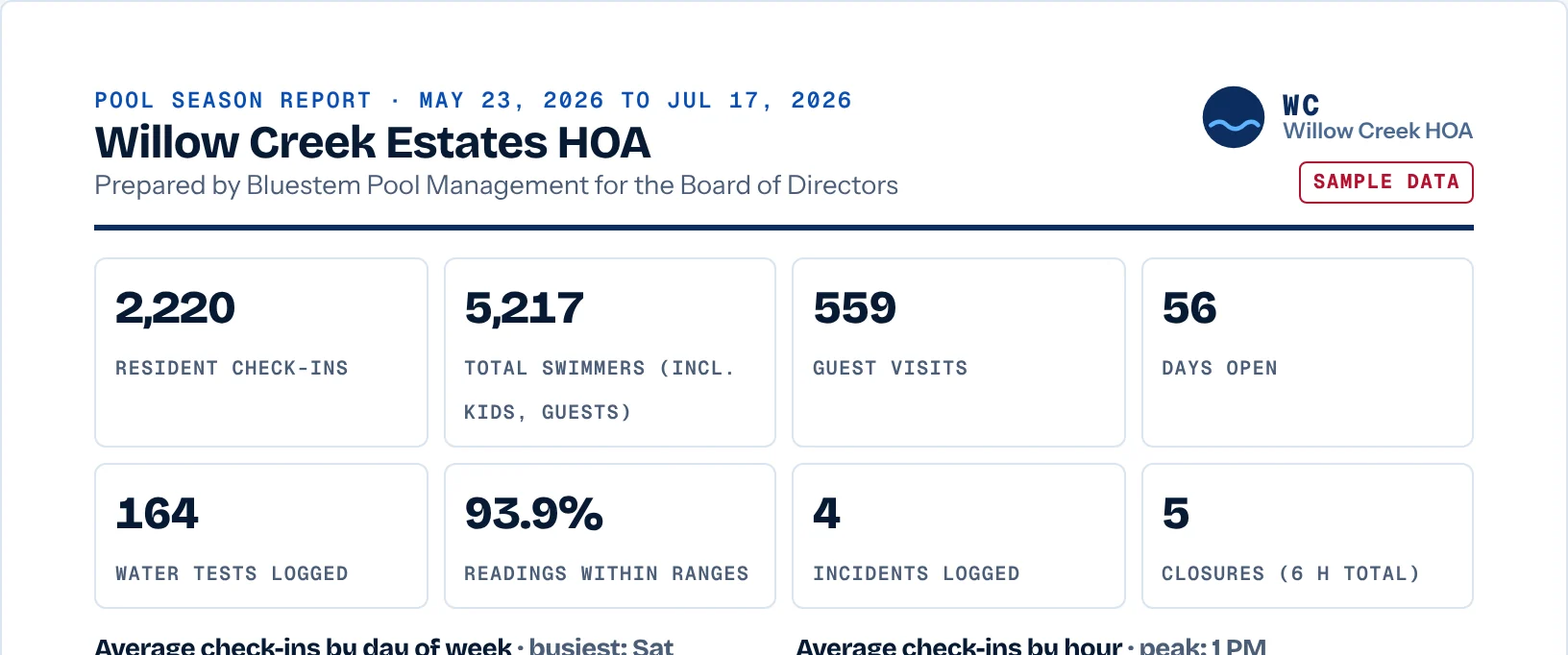
A report you hand each board: “Prepared by Your Pool Company for the Board.” Walk into renewal with numbers the other bidder doesn't have: check-ins, the busiest days and hours, water tests logged, incidents and closures.
- Your operators
Every pool on one screen.
Test reminders and weather closures show up before the board president calls. Red Cross certifications are flagged before they expire.
- Your lifeguards
No clipboard math.
Check-ins add up to the headcount on their own. A water test or an incident is a few taps on the deck tablet. If the HOA shares its address list, a check-in from an address not on it gets a gentle flag.
Before and after
Every pool has this clipboard.
Soaked by noon. Half the names you can't read. And by July it's in somebody's truck when the board asks how busy Saturdays were.
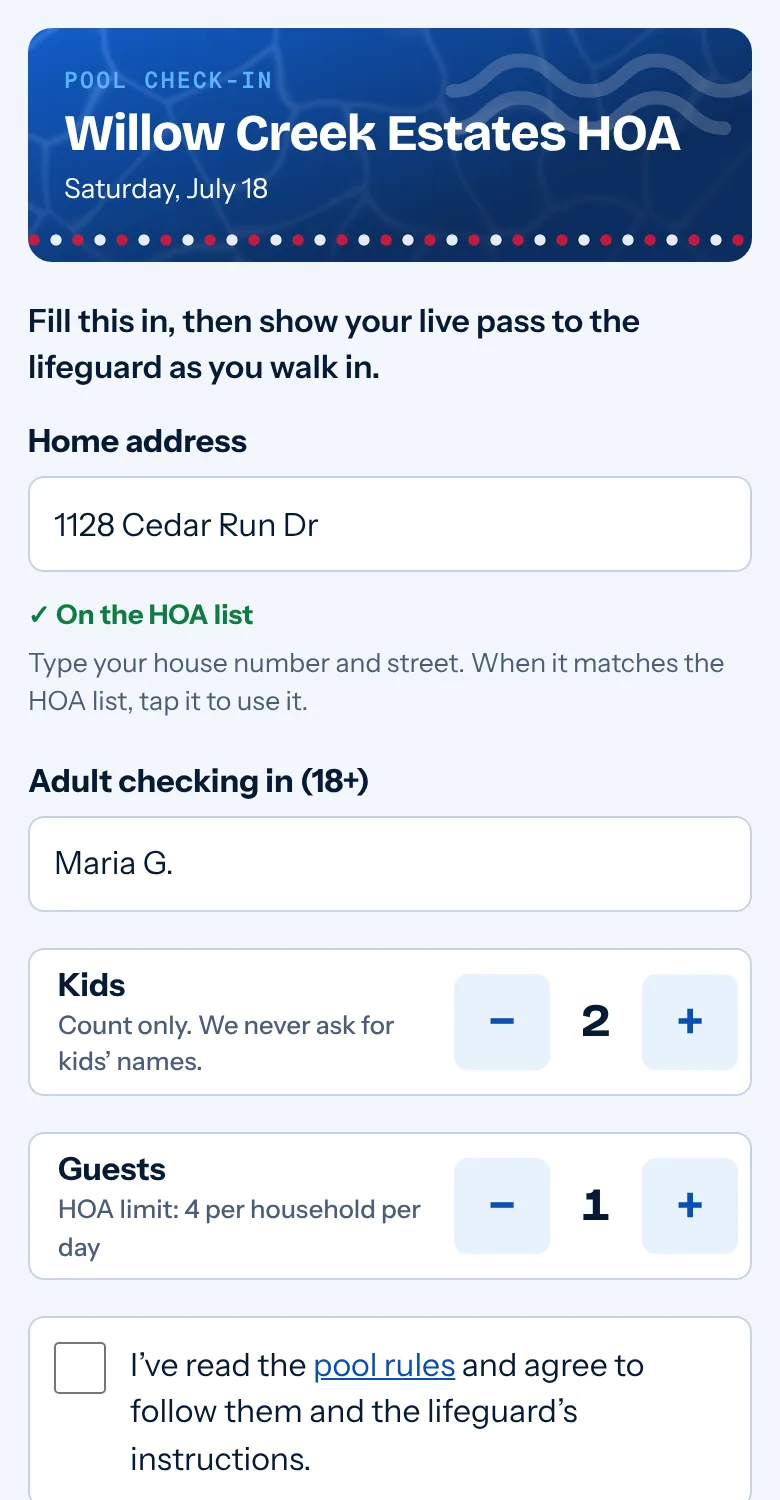
Same Saturday, same families, on Paperless Pool: the resident types the address, it's matched to the HOA's own list, then one adult's name and a head count, and it adds itself up.
keep scrolling, we'll squeegee it drySample names and addresses. Willow Creek Estates is made up.
One Saturday at the pool.
Your on-site log sheet, on the deck tablet. See every pool's log from the truck.
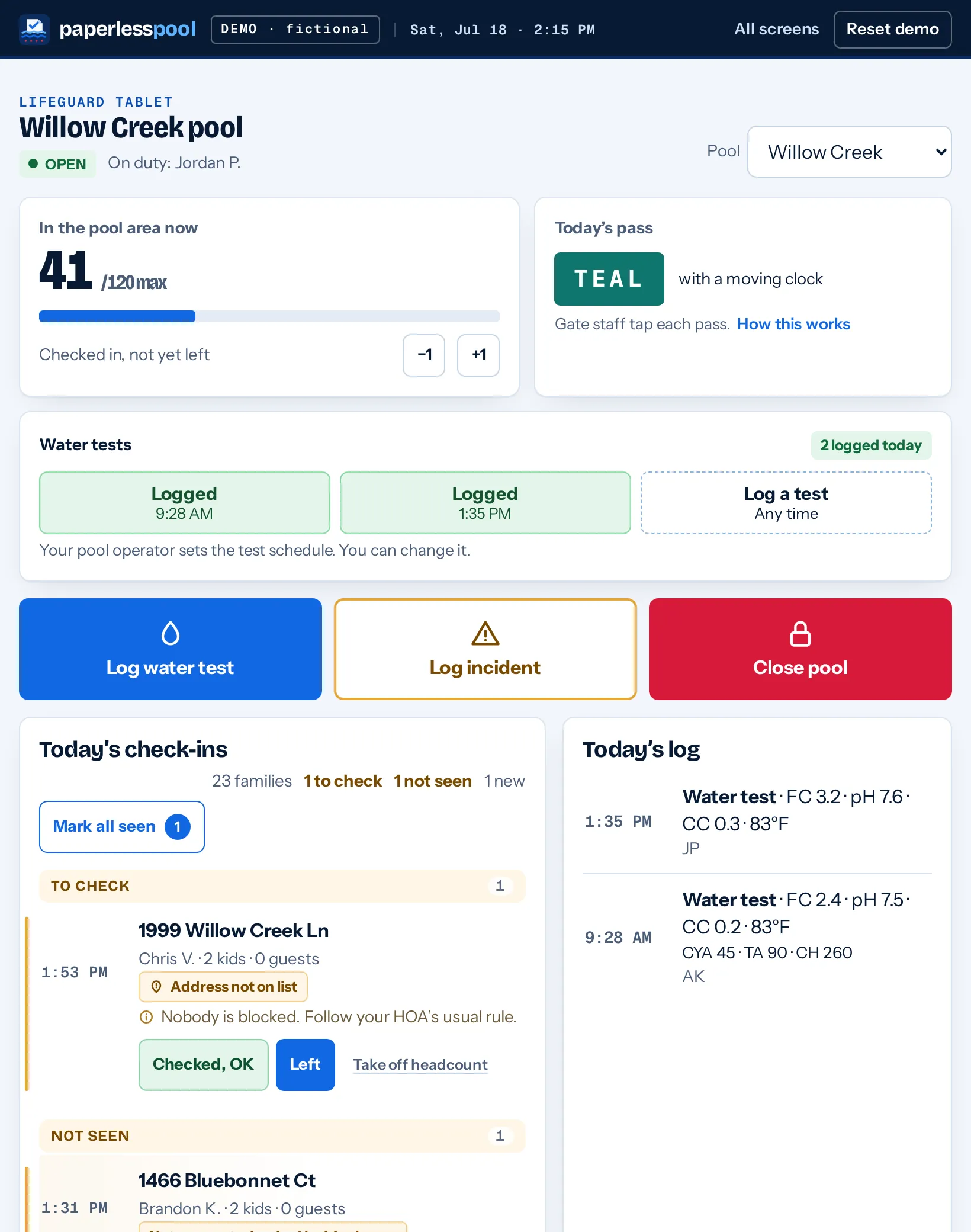
Big buttons, big numbers, readable in full sun. A new lifeguard can pick it up on their first shift, on the deck tablet or their own phone. Willow Creek and its lifeguards are fictional.
-
9:58AM
Gate opens.
Residents scan the QR on the gate sign, type their address and get a live pass with a moving clock. They show it to the lifeguard as they walk in. Nobody has to post a code every morning.
-
10:20AM
First water test.
Chlorine, pH and the rest, typed in on the deck tablet or the lifeguard's own phone. On the schedule your operator sets. A reading outside the pool's set range gets flagged right there, not at the end of the month.
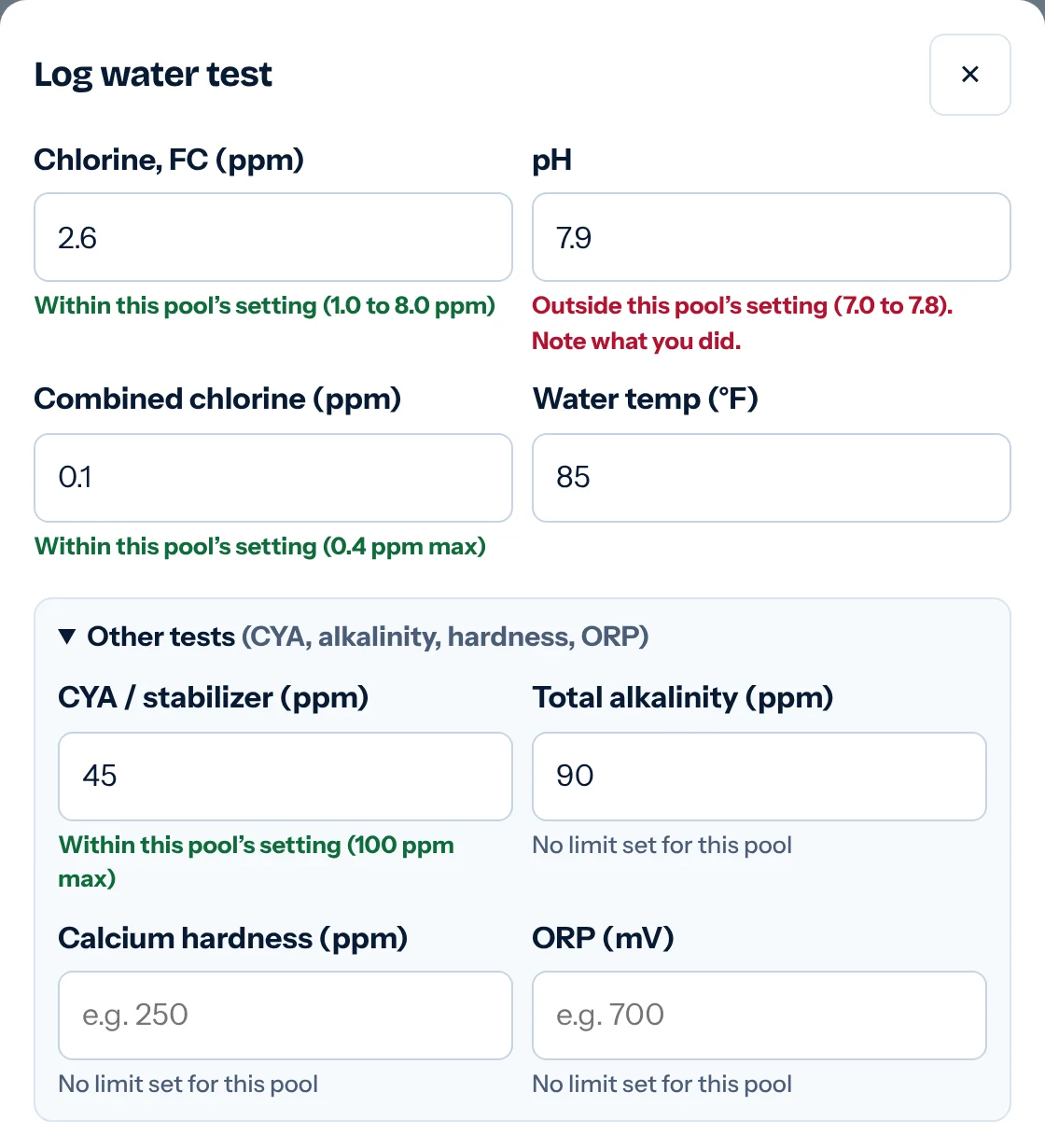
Log water test, on the deck tablet -
2:15PM
Saturday crowd.
41 people in the pool area, against a max of 120. Every check-in lands on the deck tablet and adds to the headcount. The lifeguard on the stand never taps. Whoever works the gate taps Seen at gate, or Mark all seen in a rush. An untapped pass still counts and is flagged for a second look. A family packs up, one tap takes them off.
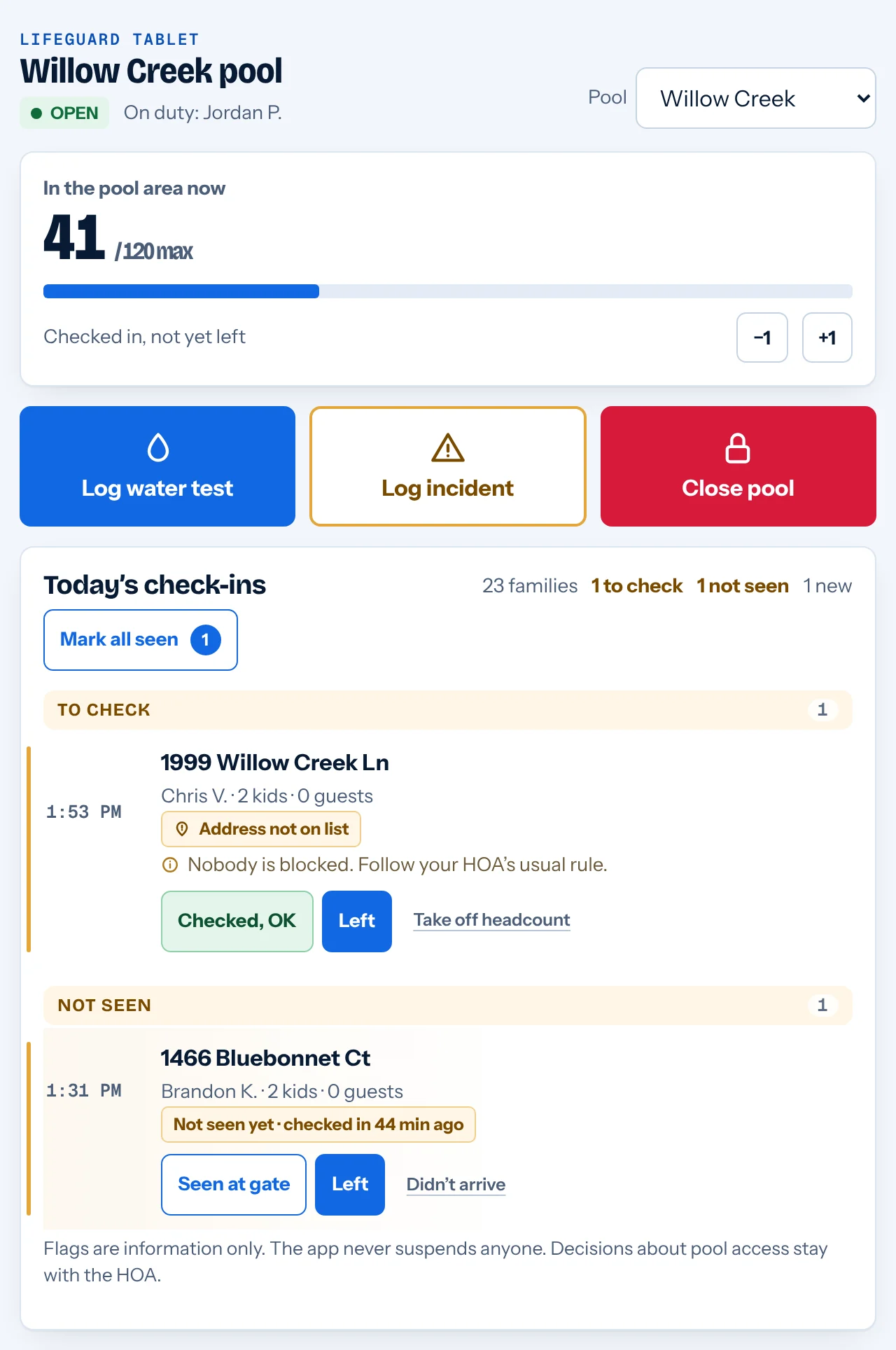
Lifeguard tablet, Willow Creek, 2:15 PM -
4:40PM
Thunder.
Everybody out. Two taps closes the pool for weather. Check-in pauses on residents' phones, and your office sees the closure right away, before the first parent calls to ask. Press the red button to see it.
Try it: be the lifeguard
LIFEGUARD TABLETWillow Creek poolOPENHear thunder? Close the pool for weather.
Resident's phone at the gateWillow Creek Estates HOAPool check-inCheck inClosed for weatherCheck-in is paused. Please check back later.Your office · all pools- Willow CreekOpen
- Cedar BendOpen
- Maple HollowOpen
A small copy of the real screens. In the live demo it works the same way on the real tablet and phone.
-
8:30PM
Lock up.
The lifeguard closes out the day. Every check-in, test, incident and closure is already in the log with a time and initials. Nobody types up a clipboard on Monday.
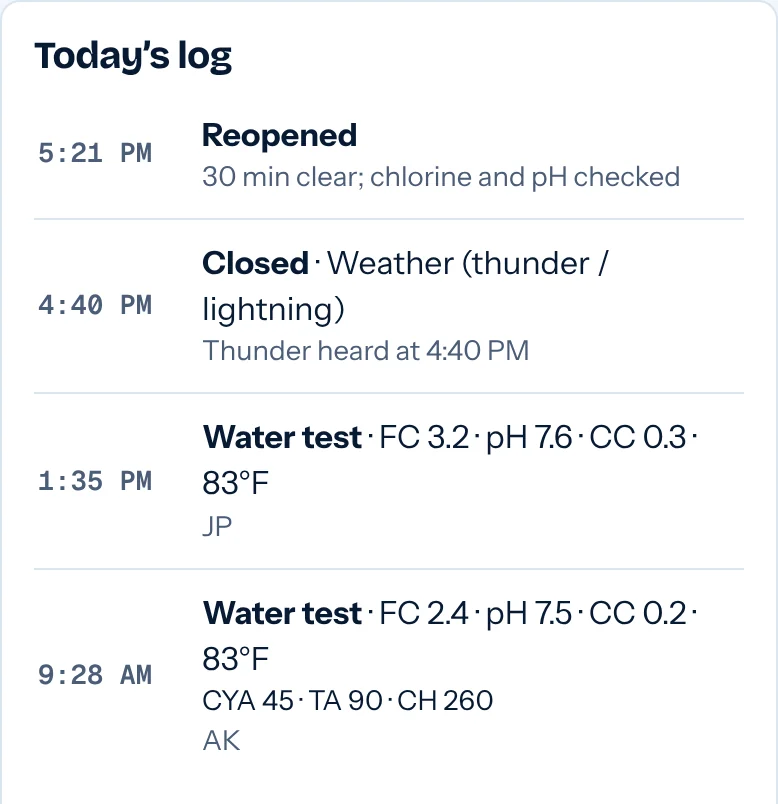
Today's log, already written
Know about it before the board president calls you.
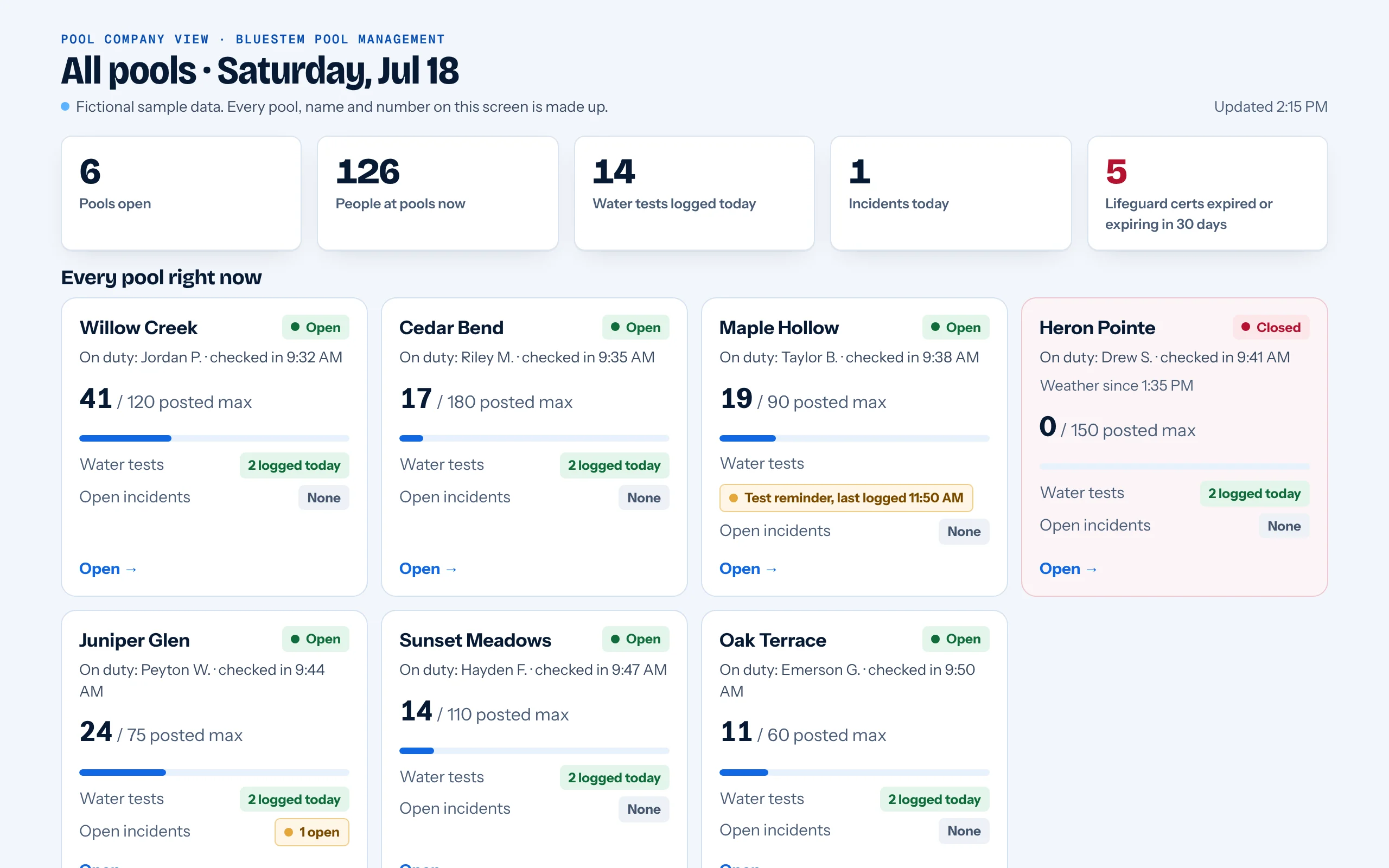
What lands on the list
- NowA pool closed for weather
- NowA test reminder, with the last log time
- TodayAn incident was logged
- SoonRed Cross certifications flagged before they expire
Sample data from the demo. Bluestem Pool Management and Willow Creek Estates HOA are made up.
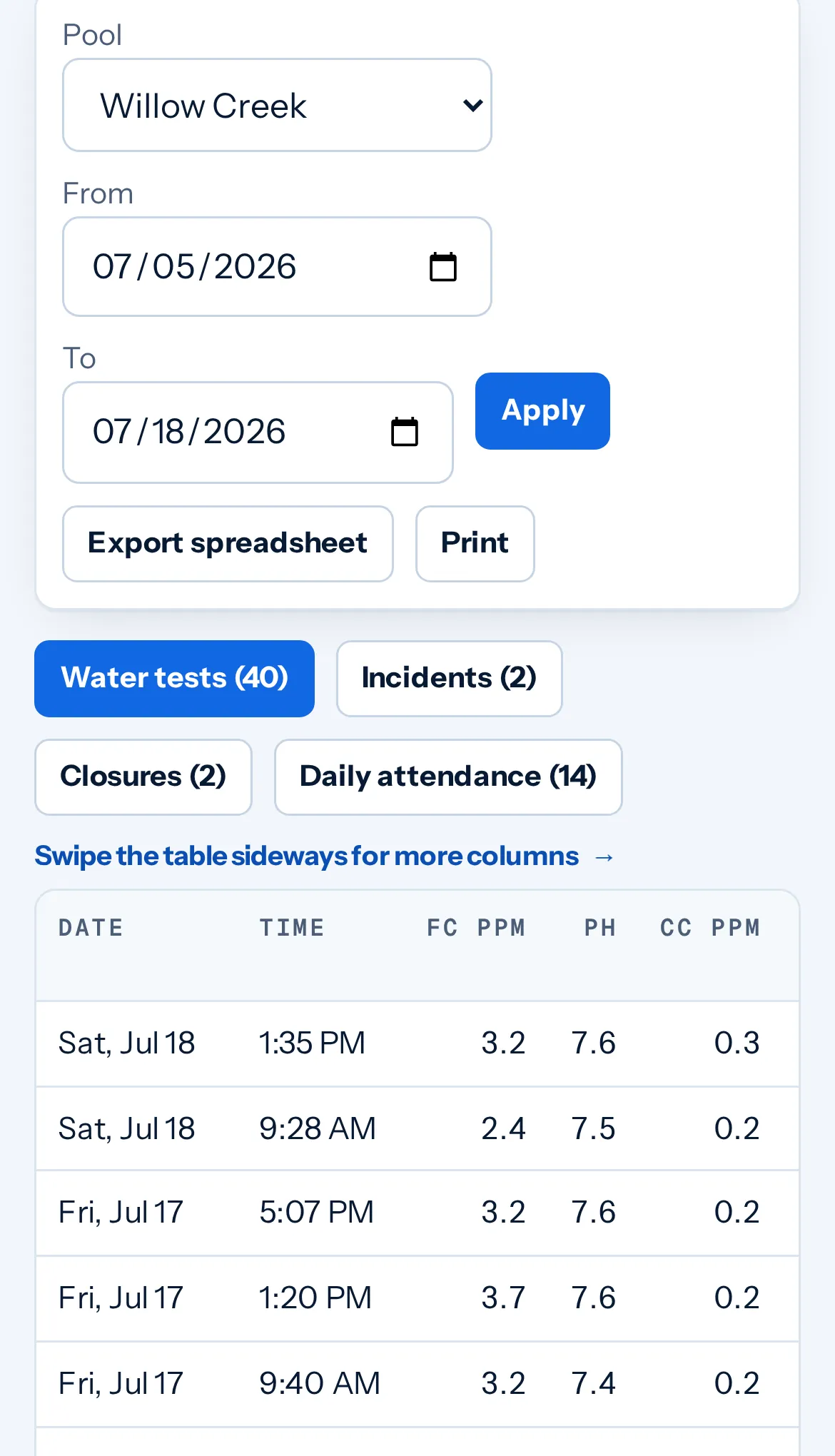
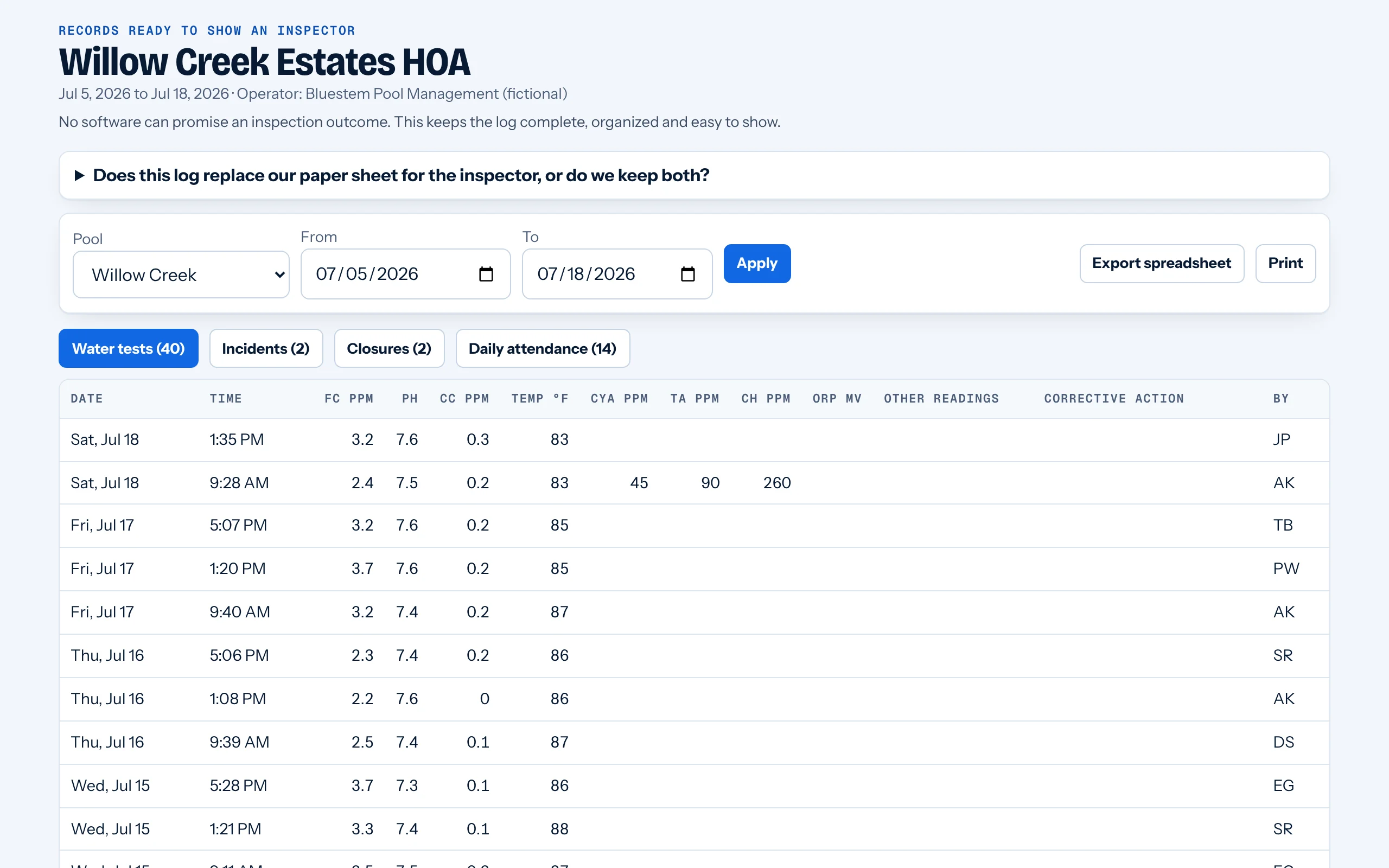
Records by pool and date
Someone asks about last July. You pull up the date range.
Pick a pool and the dates. Water tests, incidents and closures come up together, ready to print or export as a spreadsheet. Records stay available to download, so you can keep your own copy, and last July is never in a truck.
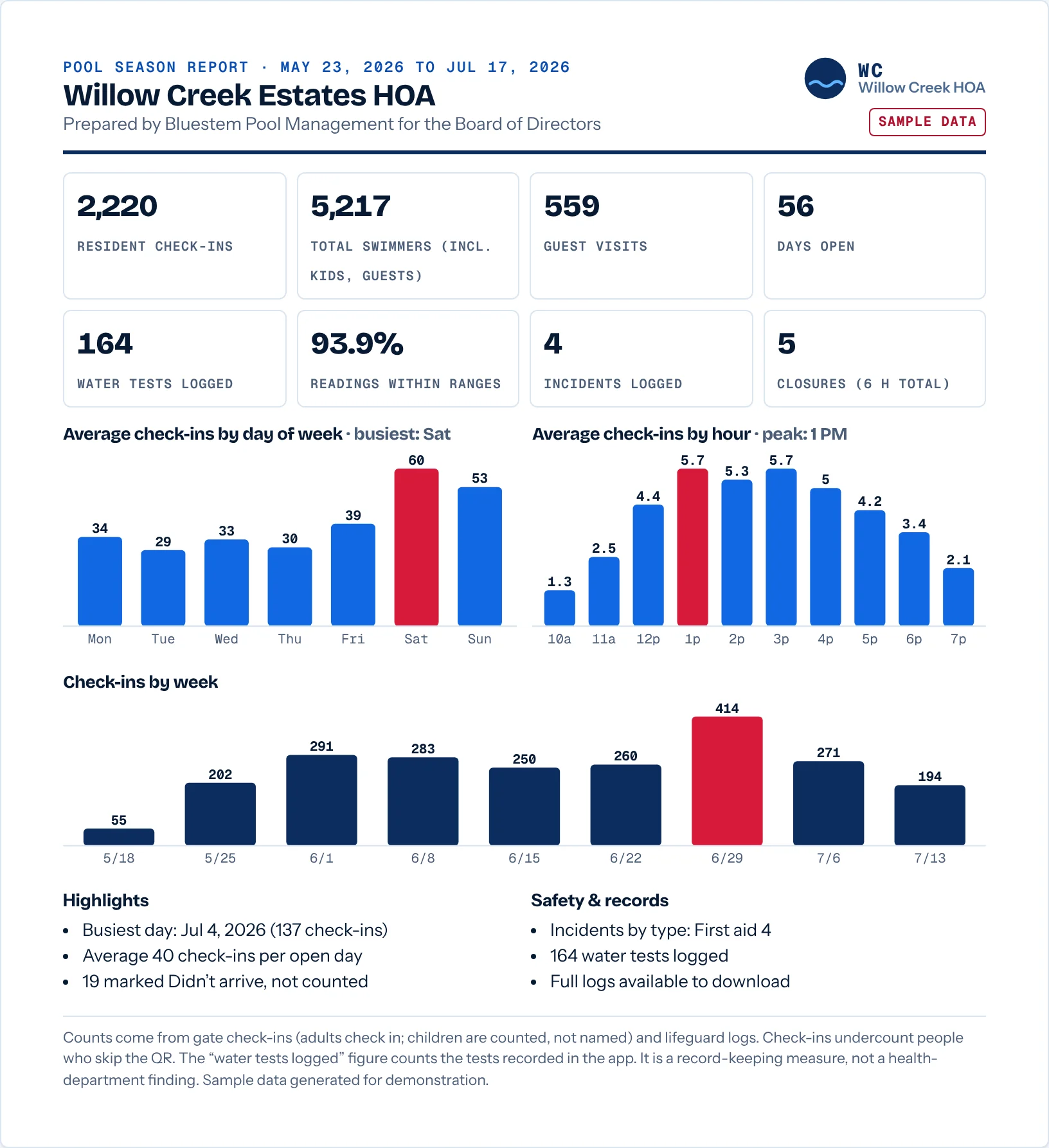
The only paper left: one page for the board.
At season's end each HOA board gets a single page: check-ins, the busiest days and hours, guests, incidents and closures. No spreadsheet homework for anybody.
Your daily pool logs, off the clipboard.
Kept on a screen, filed by pool and date, ready to print or export.
- By pool and dateWater tests, incidents, closures and daily attendance are filed by pool and date as your staff enter them.
- Your recordsYour pool records belong to you. The pilot agreement will spell this out.
- Print or exportPull up any pool’s log on the lifeguard’s phone or in the office, then print it or export a spreadsheet.
- Your operator decidesYour certified pool operator sets the test schedule and targets. The app sends reminders; your staff still run the tests.
Paperless Pool records what your staff enter and sends reminders. Your certified pool operator and your local health authority decide what each pool must test and record. This isn’t legal advice.
Pricing
Simple seasonal pricing.
Priced per pool, per season, through your pool management company.
Ask for a 20‑minute walkthroughPriced per pool, per season. We quote after the walkthrough.
Season passEvery pool
Included, every season
- SetupWe load the HOA’s resident address lists for you.
- Printed gate signsThe QR sign residents scan at the gate.
- The lifeguard quick-startA new lifeguard can pick it up on their first shift.
Why switch
- Paper sign-in sheets and clipboard logsResidents check in with a QR scan at the gate. The lifeguard tablet keeps the headcount and water test entries.
- Gate fobsKeep your fobs. Paperless Pool adds a check-in at the gate and a live headcount the lifeguard can see.
- General HOA softwareBuilt only for the pool: incident notes, a contractor dashboard for every pool and a season report for each board.
We set it up with you: your pools, your QR signs, your staff. Setup is included for every pool in your quote.
Privacy
It's your neighbors' information.
So we only ask for what the lifeguard and the board need, and we post it like a pool rule.
Paperless Pool
Check-in rules
We ask for
- The address, typed in and matched to the HOA's list
- One adult's name
- How many kids and guests, up to the HOA's limit. Never kids' names
- The time they checked in
We never ask for
- Kids' names
- Face photos
- Location tracking
- Anything to sell. The data is never sold.
Today's pass has a color and a live clock, so an old screenshot won't get anybody in. The paper sheet stays at the gate for Wi-Fi trouble or no phone. Flags are information only; the app never suspends anybody.
Why I built this
I served on my HOA's board, and the pool was my job. Residents signed a paper log book at the gate, and that was our record of who came in.
So I put up a laminated QR code at the entrance. It opened a simple sign-in form on residents' phones and logged everyone who came in. The pool contractor we worked with really liked it.
Paperless Pool is the full version of that idea: the gate, the deck and the office. If you run HOA pools and want to try it next summer, I'd like to hear what you'd change.
Andrew
Former HOA board member
Founding pilot · 2027 season
Run your 2027 season on it.
We're looking for a few pool management companies and HOA boards to run it at real pools next summer and tell us what to fix.
- We set it up: resident address lists, printed gate signs, a lifeguard quick-start
- Your paper sheet stays at the gate as a backup
Made-up pools, real product. The moving screens are copies of the working app. Open the live demo to use the real thing.
Try the live demo firstWhat boards and pool companies ask.
Don't see yours? Ask it in the walkthrough form.
Do residents have to download an app?
No. The QR code on the gate sign opens a web page in the phone's browser. There's no app and no account.
What stops someone from checking in from home?
Where someone works the gate, they tap each pass as people walk in. A check-in nobody saw still counts toward the headcount but gets flagged, and one tap takes it off if that family never came.
At a pool with no attendant, nothing in the app can prove a family walked in, and it doesn’t pretend to. Here is what it does. With the optional resident list check on, an address that isn’t on the HOA’s list shows as To check for the lifeguard. The lifeguard sees how many people the check-ins add up to and can compare that with who is actually in the pool area. The app can’t tell which check-in stayed on the couch, so it doesn’t guess. The board sets the rules for what happens next. A board that wants more can turn on an optional daily code posted at the gate, so checking in means being there to read it.
Why don't you collect kids' names?
The lifeguard needs a head count, not a roster of children. Kids are counted, never named.
What if the Wi-Fi drops, or a resident has no phone?
The paper sign-in sheet stays at the gate as a backup. The lifeguard can always let a resident sign on paper.
Busy Saturday: does the lifeguard have to tap every pass?
No. The lifeguard on the stand never taps. Whoever is at the gate does, and you choose who that is: a gate attendant, the front desk, or a lifeguard on break. In a rush, one Mark all seen tap covers the new arrivals from the last 10 minutes. A pass nobody taps still counts toward the headcount. After 20 minutes it shows as Not seen yet, so someone can take a second look. Pools without gate staff can turn flags off, and the headcount still counts every check-in.
Do we need to buy tablets?
No. It runs in the web browser on the phones and tablets you already have: a lifeguard's own phone, an older Android, the old tablet in the pump room drawer. Nothing to install.
Will it suspend residents who break the rules?
No. Flags are information for the lifeguard and the board. The app never suspends anyone. That stays the board's decision.
Can it tell if someone isn’t a resident?
Optionally. Upload the HOA’s address list and lifeguards see a flag for any address not on it. Nobody is blocked; the HOA’s own pool rules still apply. Decisions about pool access stay with the HOA.
Do we still keep a paper logbook?
Paperless Pool keeps the log on the lifeguard’s phone and in the office, and you can print it any time. Whether a pool also keeps a paper logbook is up to your pool operator and your local health authority.
Can we download our records?
Yes. Your pool records belong to you. The pilot agreement will spell this out. Pick any pool and date range, then print it or export a spreadsheet.
How long does the walkthrough take?
About 20 minutes on a call. Andrew clicks through the live demo with you and answers questions about your pools. Ask for one with the form above.
What does it cost?
It’s priced per pool, per season, through your pool management company, and agreed in writing before anything starts. Ask for a 20-minute walkthrough and we’ll go through it for your pools.
Is the demo real?
The screens are real. The data is made up: Willow Creek Estates HOA and Bluestem Pool Management are fictional, and nothing you type leaves your browser.